
Copyright 2026 © swekartor. All Rights Reserved.



App Feature
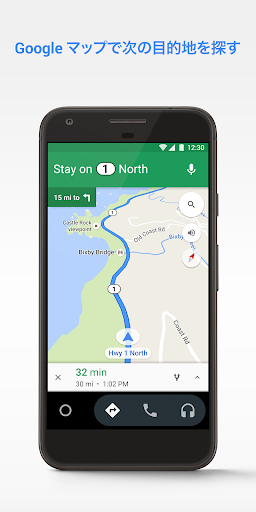
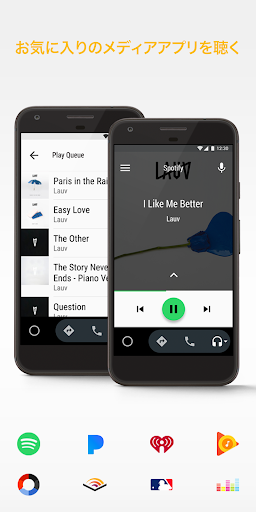
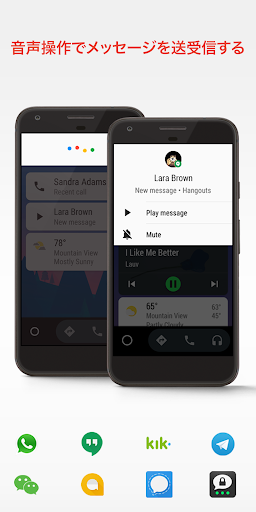
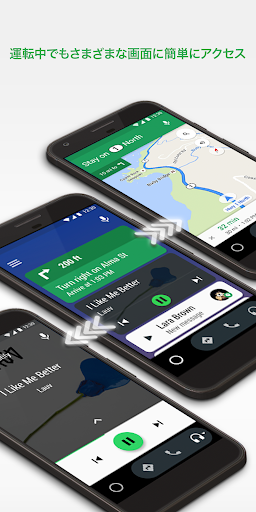
Android Auto projects a simplified, voice-first interface from your Android phone onto compatible car displays to control navigation (Google Maps/Waze), calls/messages via Google Assistant, and media from major music, podcast, and audiobook apps—aiming to reduce distraction with large touch targets and hands‑free commands.
Verdict
Verdict: A powerful, free driving companion that shines with hands‑free navigation and media, but can be flaky depending on cables, head units, and phone compatibility.
Who is it for
Best for:
- Drivers who want Google Maps/Waze, music, and messaging controlled by voice
- Owners of compatible cars who value a consistent, phone-powered infotainment experience
- Users willing to optimize connectivity (quality USB or wireless adapter) for stability
Not ideal for:
- People with older phones or finicky head units prone to frequent disconnects
- Anyone expecting fully wireless, plug‑and‑play reliability in every vehicle
- Drivers who prefer built‑in OEM navigation and controls without phone dependency
Real-world User Experience
Users like it:
Smooth integration with many vehicles and apps; clear Google Maps/Waze guidance with useful ETA, hazard, speed/camera alerts; effective Google Assistant for hands‑free calling and messaging; improved stability over time; split‑screen layouts and quick access to YouTube Music, Pandora, Amazon Music, Audible, and more; wireless adapters substantially increase reliability and convenience for many.
Users complain about:
Intermittent disconnects—especially with cheaper or loose USB cables; variability across cars and phones, with some models glitching after updates; wired-only setups can be frustrating; navigation can stop when unplugging to charge another phone; some app features (e.g., Telegram calling) are limited over Android Auto; configuration often requires accessing settings only from the car interface.
Is it Worth Paying For?
It’s free with no ads or in‑app purchases, so there’s nothing to buy—value depends on your car/phone compatibility and connection quality. Investing in a high-quality USB cable or a reputable wireless adapter can materially improve the experience.
How it Compares to Alternatives
Compared to Apple CarPlay, Android Auto offers similarly cohesive, voice‑driven control but is better aligned with Google services and Android apps; reliability varies by vehicle for both ecosystems. Versus built‑in OEM nav (e.g., TomTom), users often find Google Maps/Waze more current and flexible, though OEM systems may be more stable. Standalone phone mounts/apps are cheaper to set up but are less safe and convenient than a dashboard‑integrated, voice‑controlled UI. Android Automotive OS (built into some cars) is deeper and more native but limited to certain models.
Summary
Android Auto delivers a streamlined, voice‑forward interface that brings Google Maps/Waze, calling/messaging, and a wide range of media apps to your car’s screen. It’s extremely capable when it works well: directions are timely, alerts are helpful, and Google Assistant reduces the need to touch your phone. Real‑world reliability hinges on hardware factors—vehicle head unit, phone model, and especially cable quality—though many users report near‑flawless performance after switching to better USB cabling or a wireless adapter. With a massive app ecosystem, ongoing updates, and zero cost, Android Auto is easy to recommend if your car supports it and you’re willing to optimize your setup; just expect occasional hiccups and feature limitations depending on your specific vehicle and apps.
Ratings
Trending APP











Alternative to this app










