
Copyright 2026 © swekartor. All Rights Reserved.



App Feature
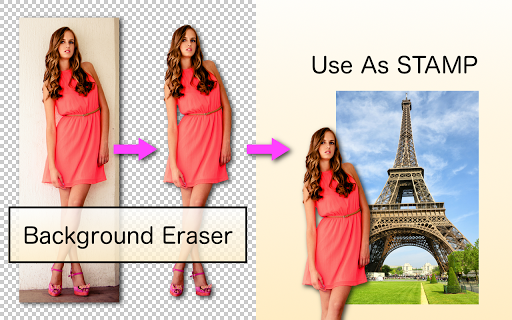
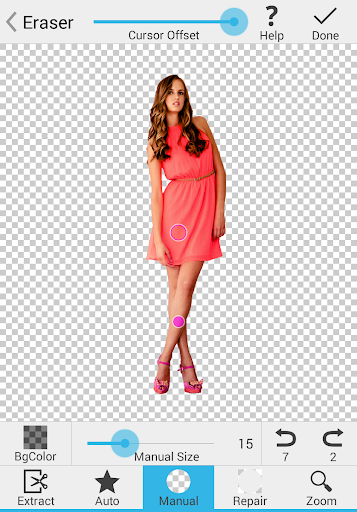
Background Eraser is a free, ad‑supported photography utility for precisely removing image backgrounds and exporting clean PNG cutouts. It offers multiple erasing modes (Magic edge-detection, Auto/Color similarity, Manual) plus a repair tool, zoom, and a clever offset crosshair cursor for fine detail work—ideal for stickers, collages, and compositing in other apps.
Verdict
Verdict: A fast, precise background remover that excels at manual control, but feels dated and lacks true project/layer management.
Who is it for
Best for:
- Users who need accurate cutouts for stickers, collages, and product shots
- People who prefer manual fine-tuning over one‑tap AI results
- Anyone seeking a lightweight, free tool with minimal in‑workflow ads
Not ideal for:
- Users wanting automatic, one‑click AI background removal every time
- Creators who need layers, history, and non‑destructive project editing
- Those who dislike any ads or need a paid ad‑free tier
Real-world User Experience
Users like it:
Consistently praised for clean, professional cutouts; the Magic/Auto tools reduce fine‑tuning; the offset crosshair greatly improves precision; minimal, non‑intrusive ads appear only after finishing; reliable for years; saves transparent PNGs without forcing new backgrounds.
Users complain about:
No ad‑free purchase option; dated UI; lacks saving editable projects/layers to revisit cuts; occasional desire for more selection tools or desktop/PC version; some report ad load increases over time.
Is it Worth Paying For?
The app is free with ads and offers no IAP; value is excellent as‑is. Many users would pay for an ad‑free or pro tier with project saving and layers, which would be worth a small, one‑time fee if offered.
How it Compares to Alternatives
Compared with AI auto‑removers (remove.bg, Adobe Express, Canva), this app trades instant automation for granular control and better edge work on tricky subjects. It’s lighter and more precise than general editors (PicsArt, Pixlr) but lacks their multi‑tool suites and layer workflows. Paired with PhotoLayers (from the same developer) it covers compositing needs well, still at zero cost.
Summary
Background Eraser focuses on doing one job extremely well: creating accurate, transparent cutouts quickly. Its Magic and Auto/Color modes handle most backgrounds, while manual and repair tools refine edges, aided by a smart crosshair cursor. Reviews highlight dependable results, minimal in‑flow ad interruptions, and years of reliability. Trade‑offs are a dated UI, no ad‑free option, and no project/layer saves—so complex edits may require companion apps. If you want precise control over background removal without subscriptions or heavy bloat, it’s a standout free choice.
Ratings
Trending APP








Alternative to this app










