
Copyright 2026 © swekartor. All Rights Reserved.


Information about Drone Remote Control
App Feature
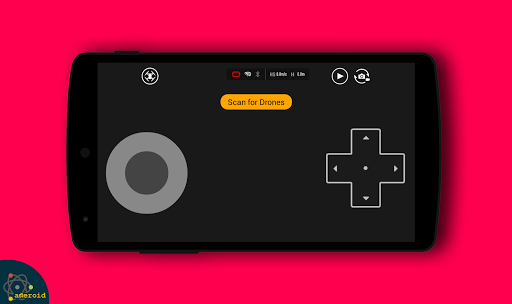
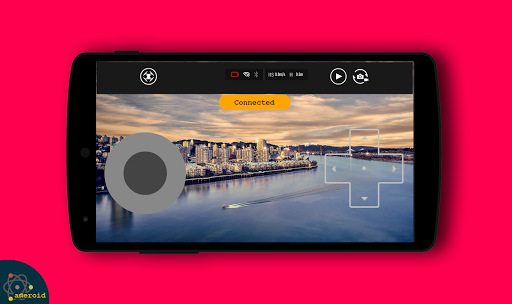
Drone Remote Control aims to turn your Android phone into a drone controller with FPV streaming, photo/video capture, and autopilot-style features like waypoints and follow-me. It promises simple setup, manual/auto flight controls, and compatibility with many (but not all) Wi‑Fi camera drones.
Verdict
Verdict: A flashy, ad-supported controller app that can work for some Wi‑Fi drones, but hit-or-miss compatibility and reliability make official apps safer bets.
Who is it for
Best for:
- Owners of budget Wi‑Fi camera drones seeking a quick, free controller
- Tinkerers willing to experiment with compatibility and settings
Not ideal for:
- Pilots of branded drones needing full, reliable feature support (e.g., DJI, Parrot)
- Users who expect guaranteed compatibility, safety checks, and robust failsafes
Real-world User Experience
Users like it:
Many praise the simple interface and the novelty of using a phone as a controller; when it connects, FPV preview and basic takeoff/landing work as expected for supported drones.
Users complain about:
Frequent complaints about incompatibility with popular models, unstable connections, control lag, aggressive ads, and features that don’t match expectations (e.g., advanced modes not working on their hardware).
Is it Worth Paying For?
The app is free with ads and no IAP. There’s nothing to buy, so it’s low-risk to try; just be prepared for ads and potential incompatibility.
How it Compares to Alternatives
Compared with official manufacturer apps (DJI Fly/GO 4, Parrot FreeFlight, Ryze Tello, Holy Stone, Potensic), this lacks guaranteed compatibility, firmware integration, geofencing/safety checks, and polished reliability. Versus enthusiast options like QGroundControl or Litchi (paid), it’s simpler but far less capable and less dependable. It’s closer to a universal-remote experiment than a professional flight tool.
Summary
Drone Remote Control promises a universal, phone-based controller with FPV and advanced flight options, backed by a solid 4.2 average rating but mixed real-world outcomes. It can be fun and functional with certain Wi‑Fi drones, offering straightforward takeoff/landing and camera controls, yet many users encounter connection failures, latency, and non-working features on their hardware. With ads and no paid tier, it’s an easy, no-cost experiment for casual users and tinkerers, but pilots seeking dependable control, safety features, and full compatibility should stick with official or well-known alternatives.
Ratings
Trending APP





Alternative to this app










