Copyright 2026 © swekartor. All Rights Reserved.


Information about FD VR - Virtual App Launcher
App Feature
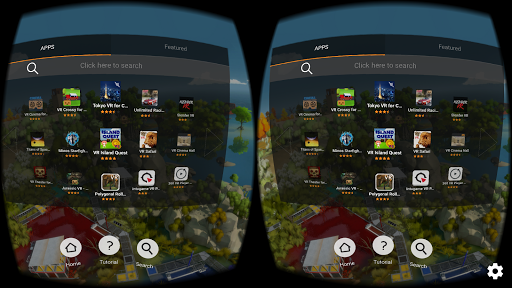
A lightweight VR launcher that lets you browse and start installed VR apps from a headset-friendly interface. It targets Google Cardboard/Daydream-style viewers, focusing on quick access rather than full media features. Customization options and broad app compatibility aim to streamline navigating your phone’s VR content.
Verdict
Verdict: A convenient, free VR app launcher for Cardboard/Daydream, but stability quirks and limited scope make it best as a companion—not a full VR hub.
Who is it for
Best for:
- Users who mainly need a simple VR home to launch existing VR apps
- Cardboard/Daydream owners looking for a free, headset-friendly launcher
- Fulldive ecosystem users who want an add-on rather than the full suite
Not ideal for:
- Anyone wanting to convert non‑VR apps into side‑by‑side VR automatically
- Users seeking an all‑in‑one VR suite (YouTube VR, browser, gallery, social)
- Those who prioritize rock‑solid stability across diverse third‑party apps
Real-world User Experience
Users like it:
Easy access to third‑party VR apps through a unified VR UI; integrates with common Cardboard/Daydream headsets; conceptually fits well as a minimal launcher add‑on to the broader Fulldive ecosystem.
Users complain about:
Force closes or returns to the launcher when launched apps expect menus positioned awkwardly (e.g., below the user's feet); lacks native side‑by‑side conversion for non‑VR apps despite user interest; occasional instability when pulling in outside apps.
Is it Worth Paying For?
It’s free with no ads and no in‑app purchases, so there’s nothing to pay for. As a no‑cost utility, it’s worth trying if you need a VR launcher; value comes from convenience rather than features.
How it Compares to Alternatives
Compared to full VR suites like the main Fulldive app (which includes VR YouTube, gallery, browser, and market), this launcher is narrower and lighter. Against alternatives like basic Cardboard launchers or legacy Daydream Home, it offers an approachable way to start VR apps but not deep integrations. Tools like VaR’s VR or Native SBS focus on converting 2D content to side‑by‑side, which this launcher does not provide. Overall, it’s a simple, free launcher versus richer but heavier or more specialized alternatives.
Summary
FD VR - Virtual App Launcher is a free, minimalist VR home screen for Cardboard/Daydream that centralizes launching your installed VR apps. It’s designed as an extension to the Fulldive ecosystem rather than a full media platform, and it doesn’t add VR to non‑VR apps. The experience can be handy and straightforward, but users report occasional force closes and quirks when third‑party apps have unusual menu placement. With a 3.4 rating and 500K+ installs, it’s a practical, no‑cost way to organize VR apps if you accept its limitations; those seeking a comprehensive VR experience should consider the full Fulldive app or specialized players that handle 2D‑to‑VR conversion.
Ratings
Trending APP






Alternative to this app