
Copyright 2026 © swekartor. All Rights Reserved.


Information about Instant Boost (Addon for Gamers GLTool)
App Feature
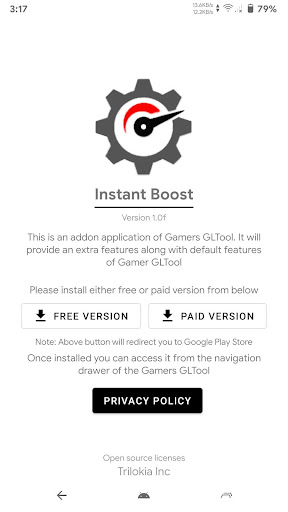
Instant Boost is a free add-on for Gamers GLTool that provides one-tap performance optimization for Android games, aiming to reduce lag, stabilize ping, and improve FPS. It complements GLTool with quick-boost triggers, deeper graphics tuning (resolution, textures, shadows), and smart battery optimizations for longer gaming sessions.
Verdict
Verdict: A handy, no-cost booster for Gamers GLTool users, but useless as a standalone app.
Who is it for
Best for:
- Gamers already using Gamers GLTool (v1.4+)
- Players seeking one-tap boosts and easy ping/FPS stabilization
- Tinkerers who want granular graphics and battery tuning
Not ideal for:
- Users without Gamers GLTool (it won’t work alone)
- Those expecting automatic, zero-setup optimization
- Players wanting a full-featured standalone game booster
Real-world User Experience
Users like it:
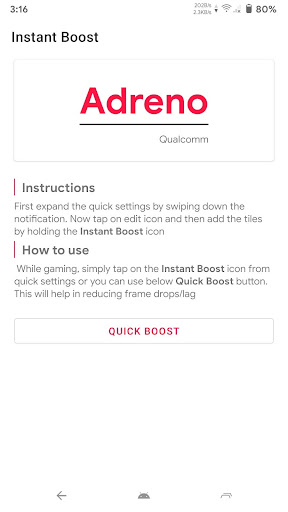
Once installed via GLTool’s Add-ons menu, users report effective quick boosts, smoother gameplay, and more stable ping; the notification shade toggle makes on-the-fly boosting convenient during launches.
Users complain about:
Setup and discovery can be unintuitive (must install and access through GLTool and enable a quick settings toggle); requires the base GLTool app, so it adds dependency rather than replacing it.
Is it Worth Paying For?
The add-on is free and ad-free with no IAP, offering clear value if you already use GLTool. If you don’t have GLTool, you’ll need its free or paid version; the add-on itself doesn’t add costs.
How it Compares to Alternatives
Compared with standalone game boosters and generic GFX tools, Instant Boost’s strength is tight integration with Gamers GLTool and a fast, notification-based boost flow. Alternatives may work without dependencies but often lack GLTool’s combined tuning depth and integrated ping/FPS tools. OEM Game Modes are simpler but usually less customizable.
Summary
Instant Boost (Addon for Gamers GLTool) is a focused companion that enhances GLTool with instant, one-tap performance boosts, flexible graphics controls, and smarter battery use. It’s free, clean of ads/IAPs, and works best for players who already rely on GLTool to tune resolution, textures, and network stability. Expect a brief learning curve: you must install and trigger it through GLTool and optionally add a quick settings toggle for rapid boosting. If you want a lightweight way to smooth gameplay and stabilize ping within the GLTool ecosystem, this is a worthwhile add-on; if you need a standalone booster, look elsewhere.
Ratings
Trending APP










Alternative to this app










