
Copyright 2026 © swekartor. All Rights Reserved.



App Feature
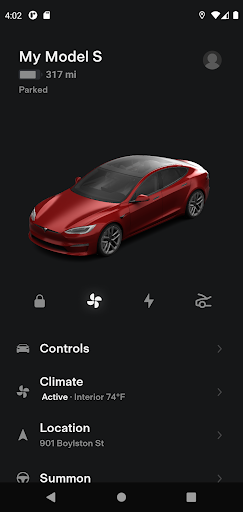
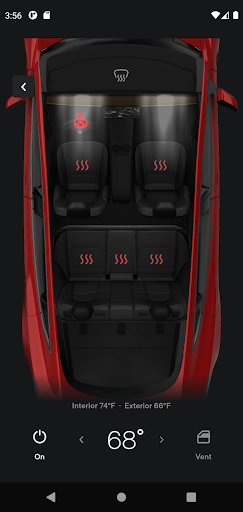
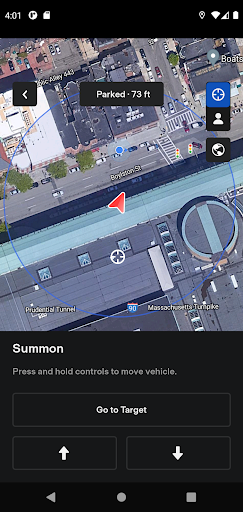
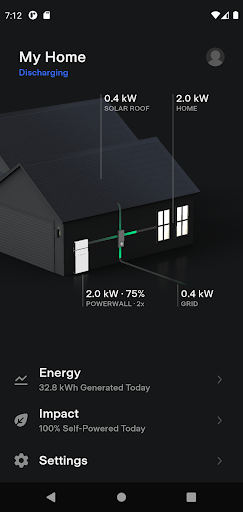
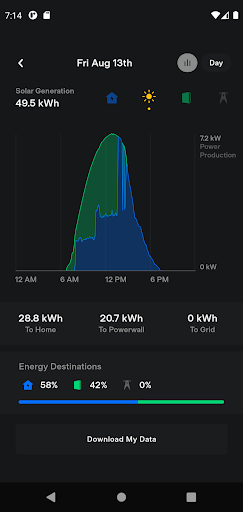
A companion app for Tesla vehicles and Powerwall that lets owners remotely monitor and control charging, climate, locks, location, media, and select Autopilot/Summon features, plus view and download home energy generation/usage data.
Verdict
Verdict: A powerful, owner-focused control hub that shines when it works, but periodic reliability hiccups keep it from feeling consistently polished.
Who is it for
Best for:
- Tesla vehicle owners who want robust remote control (charge, climate, locks, location).
- Powerwall/solar owners who need real-time energy monitoring and historical data access.
Not ideal for:
- Non‑Tesla drivers or those seeking cross‑brand vehicle control.
- Users expecting flawless connectivity in weak Wi‑Fi/LTE environments or enterprise‑grade stability.
Real-world User Experience
Users like it:
Rich remote controls (preconditioning, lock/unlock, locate, Summon), restored energy graphs with a date picker for quick history navigation, prompt fixes for issues (e.g., massive storage usage resolved), and new additions like remote camera access; many rely on it daily, even using phone-as-key convenience.
Users complain about:
Intermittent connection problems after updates, situations where the app loops on 'last seen' or won’t wake the car (often tied to weak vehicle Wi‑Fi), and occasional bugginess that undermines otherwise excellent functionality.
Is it Worth Paying For?
Free with no ads or in‑app purchases; if you own a Tesla vehicle or Powerwall, it’s essential and offers full value at no cost.
How it Compares to Alternatives
Compared to other automaker apps (e.g., FordPass, MyChevrolet, Hyundai Bluelink), Tesla offers deeper EV‑specific controls (charging, preconditioning granularity, Summon for Autopilot) and integrated home energy insights for Powerwall users. However, like many OEM apps, it can suffer from connectivity and post‑update reliability issues; third‑party energy apps may offer broader cross‑hardware analytics but lack direct vehicle controls.
Summary
Tesla’s app delivers a tightly integrated experience for vehicle and home energy management: real‑time charging and climate control, location tools, media access, Summon for eligible cars, and detailed Powerwall analytics with downloadable history. Recent updates restored energy graphs and added a date picker, improving day‑to‑day usability, and Tesla has shown it can quickly patch regressions like storage bloat. That said, users still encounter occasional connection loops or wake‑up failures—often exacerbated by weak Wi‑Fi around the car—which can make the experience feel uneven. For Tesla owners, it’s an indispensable, free control center that meaningfully enhances ownership; just expect occasional rough edges after updates or in challenging network conditions.
Ratings
Trending APP












Alternative to this app










