
Copyright 2026 © swekartor. All Rights Reserved.


Information about Sound Meter
App Feature
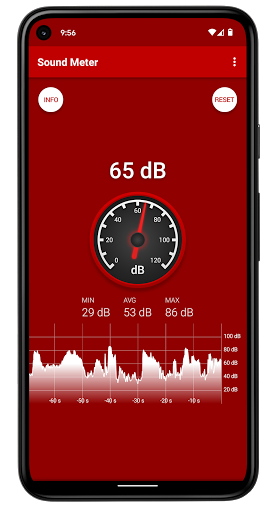
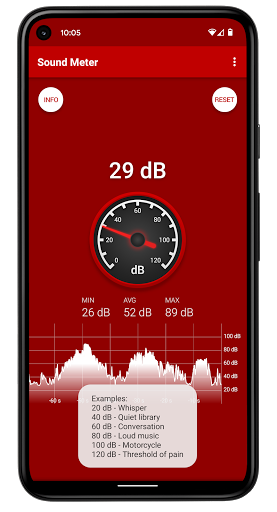
Sound Meter turns your Android device into a simple sound level meter, showing real-time decibel readings with both analog (needle) and digital displays, plus min/avg/max stats and a rolling graph. It leverages the phone mic (or an external calibrated USB mic) to monitor environmental noise for quick checks and comparisons.
Verdict
Verdict: A polished, no-fuss decibel meter ideal for everyday noise checks, but not a substitute for pro SPL tools or high-volume measurements.
Who is it for
Best for:
- Casual noise monitoring at home, work, or outdoors
- Quick comparisons (e.g., speakers, exhausts, appliances) with visual history
- Users who value a clean UI and low-friction, ad-light experience
Not ideal for:
- Professional acoustics work needing calibration, A/C/Z weighting, logging/export
- Measuring very loud sources (> ~90 dB) due to phone mic limits
- Those requiring high-accuracy compliance measurements
Real-world User Experience
Users like it:
Consistently praised for accuracy (within phone mic limits), clarity of the analog/digital display, and the rolling chart that captures spikes over time. Many find it stable, fast-refreshing, and genuinely useful for everyday tasks—from balancing home theater speakers to documenting neighborhood or transport noise. Ads are reported as unobtrusive, and the one-time ad removal is appreciated.
Users complain about:
Hardware-driven ceiling around ~89–90 dB limits peak readings. Lacks some pro features (C-weighted averaging, adjustable axes, pause/scroll, dark mode/color themes, background/locked-screen operation). Occasional prompts to rate the app can be a minor annoyance.
Is it Worth Paying For?
Yes, if you use it regularly: the ~$1.99 to remove ads is a fair one-time upgrade for a smoother, distraction-free tool. The free version is already very usable with minimal ad intrusion; the IAP mainly enhances comfort rather than unlocking critical features.
How it Compares to Alternatives
Compared to other Android decibel meters, Sound Meter stands out for its straightforward UI, stability, and useful session stats/graph without heavy ad clutter. Some competitors offer advanced capabilities—calibration profiles, A/C/Z weighting, logging/export, wider SPL ranges—but often with more ads or complexity. For rigorous accuracy or levels above ~90 dB, a dedicated hardware SPL meter or a pro app plus a calibrated external mic is the better choice.
Summary
Sound Meter is a highly rated, lightweight SPL app that nails the basics: live dB readouts, min/avg/max tracking, and a rolling graph that makes comparing sources and capturing brief spikes simple. Reviews highlight its responsiveness, reliability, and tasteful ad model, with an inexpensive option to go ad-free. Its limitations stem from phone microphone hardware and a feature set aimed at simplicity rather than lab-grade analysis. If you need a practical everyday noise checker with a clear visual history, it’s excellent; if you require calibrated, standard-weighted measurements or very high-level accuracy, look to pro tools or external hardware.
Ratings
Trending APP









Alternative to this app









