
Copyright 2026 © swekartor. All Rights Reserved.



App Feature
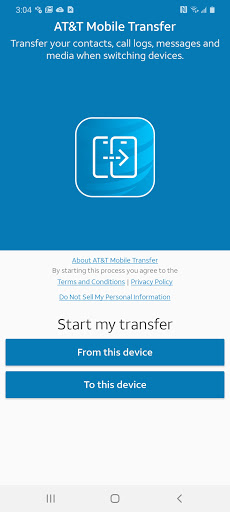
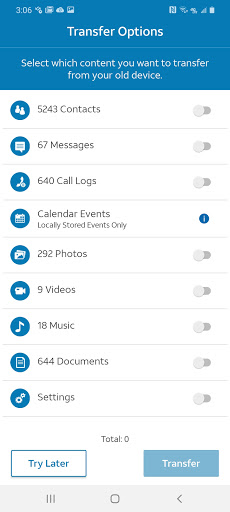
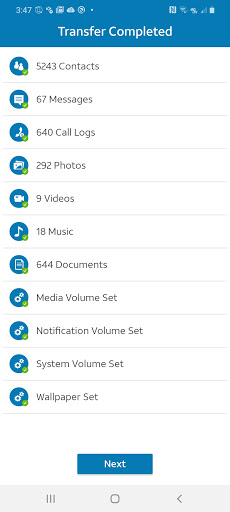
AT&T Mobile Transfer securely moves contacts, photos, videos, music, messages, and more between old and new phones, with seamless Android↔iOS support and an emphasis on quick, encrypted transfers.
Verdict
Verdict: A fast, secure, and user-friendly phone-to-phone transfer tool, especially strong for AT&T customers switching between Android and iOS.
Who is it for
Best for:
- AT&T customers upgrading to a new device who want a simple, guided migration
- Users moving between Android and iOS who need cross‑platform data transfer
- Anyone seeking a no-cost, secure way to copy core data (contacts, media, messages)
Not ideal for:
- Power users needing deep app data migration or complex settings carryover
- Folks without access to both devices at once or a stable Wi‑Fi connection
- Users outside AT&T’s ecosystem who prefer OEM-native tools
Real-world User Experience
Users like it:
High satisfaction (4.7 rating) suggests quick setup, reliable transfers of contacts and media, and an intuitive step-by-step process that works across Android and iOS.
Users complain about:
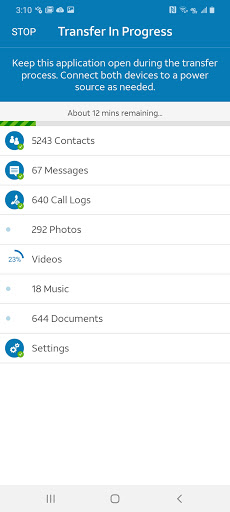
Transfers can depend on Wi‑Fi quality; very large media libraries may take time; some app-specific data or settings may not carry over, and non-AT&T users may prefer alternatives tailored to their devices.
Is it Worth Paying For?
The app is free with no in‑app purchases; given its reliability and cross‑platform support, it offers strong value at zero cost.
How it Compares to Alternatives
Compared with Google’s Data Transfer Tool and Samsung Smart Switch, AT&T Mobile Transfer is carrier-agnostic in scope but not as tightly integrated into specific OEM setup flows. It’s more cross‑platform than Samsung’s tool and often simpler than Apple’s Move to iOS for mixed ecosystems. Verizon’s Content Transfer is similar, but AT&T’s app is a strong option for AT&T users due to clear guidance and stable performance.
Summary
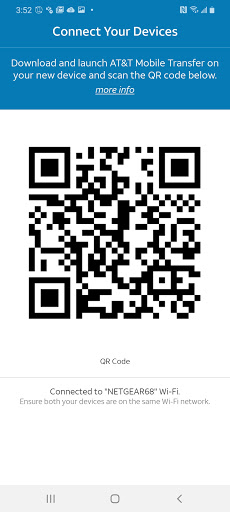
AT&T Mobile Transfer focuses on making phone upgrades painless: install on both devices, scan/connect, choose what to move, and let it securely transfer your contacts, photos, videos, music, messages, and more. Its standout strengths are ease of use, strong cross‑platform support, and encrypted transfers that inspire confidence. While advanced app data and system settings aren’t its domain and very large libraries may require patience, the overall experience—reflected in its high rating and massive install base—suggests a dependable, hassle‑free migration path, especially compelling for AT&T customers and anyone seeking a straightforward, free solution.
Ratings
Trending APP












Alternative to this app









