
Copyright 2026 © swekartor. All Rights Reserved.



Information about Settings
App Feature
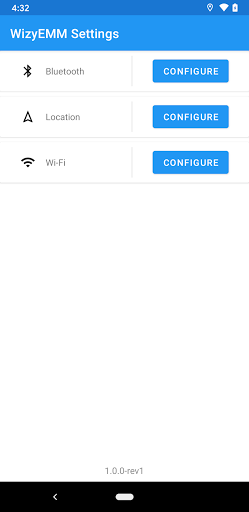
A lightweight utility from WizyEMM that provides quick shortcuts into core Android settings (Wi‑Fi, Bluetooth, time/region, notification volume) to streamline access without digging through menus.
Verdict
Verdict: A simple, reliable settings shortcut hub that speeds up routine tweaks, but offers little beyond direct links to Android’s built‑in controls.
Who is it for
Best for:
- Users who want one‑tap access to common settings (Wi‑Fi, Bluetooth, volume).
- Beginners or less tech‑savvy users who appreciate clear, straightforward navigation.
- Enterprises or EMM contexts needing a clean, dedicated settings entry point.
Not ideal for:
- Power users seeking deep customization, automation, or advanced diagnostics.
- Anyone expecting visuals, themes, or a revamped settings UI beyond shortcuts.
- Users who already rely on robust quick‑settings tiles or automation apps.
Real-world User Experience
Users like it:
Feedback highlights reliability, ease of use across age groups, and time savings by making phone management quicker. Several users note it consistently performs as expected and helps clarify otherwise confusing configuration steps.
Users complain about:
A few report occasional glitches (“something went wrong”), inconsistent color/theme behavior (sometimes black & white) and a generally dull screen appearance. There’s also an implicit limitation: it largely mirrors native settings without added depth.
Is it Worth Paying For?
The app is free with no ads and no in‑app purchases, so there’s nothing to pay for—good value if you want faster access to system settings.
How it Compares to Alternatives
Compared to built‑in Android settings, it mainly reduces taps by exposing direct shortcuts; it does not replace or enhance the underlying system pages. Versus other shortcut or launcher utilities (e.g., generic settings shortcut apps, activity launchers, or quick‑settings tile customizers), it’s more minimal and less configurable but simpler and ad‑free. Automation tools (like task/macro apps) offer far more power and triggers but at the cost of complexity.
Summary
Settings by WizyEMM focuses on one job—getting you into key Android settings faster—and does it with a lightweight, no‑ads approach trusted by millions. Users praise its reliability and clarity, especially for quick Wi‑Fi, Bluetooth, time/region, and volume adjustments. It’s not a feature‑packed control center: there’s no deep customization, automation, or visual flair, and a handful of users mention occasional glitches or drab visuals. If you want a straightforward, free shortcut hub that streamlines common device tweaks, it’s an easy recommendation; if you need rich control or workflow automation, look to more advanced alternatives.
Ratings
Trending APP












Alternative to this app










