
Copyright 2026 © swekartor. All Rights Reserved.



Information about VivaVideo - Video Editor&Maker
App Feature
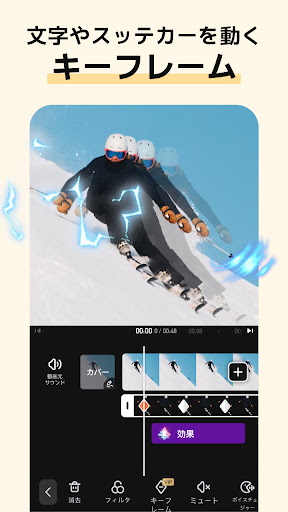
VivaVideo is a mobile video editor focused on fast, polished creation for social media. It blends beginner-friendly tools (trim, cut, split, transitions, text, stickers, PIP, speed control) with pro options (keyframes, chroma key, masking, smart tracking, mosaic). Recent AI features include text-to-video avatars, AI music/voice, auto captions/translation, image-to-video, cutout/background removal, beat sync, and slow motion.
Verdict
Verdict: A powerful, beginner-friendly editor with standout AI tools, but the subscription model and watermarks may deter casual or infrequent creators.
Who is it for
Best for:
- Creators who want quick, polished TikTok/Instagram/Reels content with templates and AI assists
- Beginners seeking an intuitive editor that scales into advanced features like keyframes and chroma key
- Mobile-first editors who value rich effects, transitions, and PIP layers
Not ideal for:
- Users who need a one-time purchase with no watermark or subscriptions
- Professionals requiring desktop-grade timeline controls, multi-track audio views, or deep color workflows
- Those who edit only a few times a year and won’t recoup a subscription’s value
Real-world User Experience
Users like it:
Consistently praised for ease of use and speed—many users make attractive slideshows/videos in minutes. Strong library of effects, transitions, text styles, and templates; capable pro features for mobile. Free tier saves projects, offers decent content, and supports adding custom music. AI tools and audio extraction are appreciated; overall quality feels close to desktop for many tasks.
Users complain about:
Free version watermark and time/feature limits; some dislike the subscription over a one-time purchase. Occasional glitches (e.g., white images in slideshows), VIP status not syncing after updates, and needing to repeatedly restore purchases or favorites. A few UX nitpicks like toggling photo zoom per image and limited simultaneous audio/video timeline views.
Is it Worth Paying For?
Yes—if you edit regularly. The free tier is usable but includes a watermark and some limits; VIP unlocks more assets, removes watermark, and expands capabilities. Reviewers praise value but note subscription fatigue; it’s worth it for frequent creators, less so if you edit only occasionally.
How it Compares to Alternatives
Against CapCut and InShot, VivaVideo competes well on ease, effects, and templates; CapCut may edge it on advanced, free AI features and social integration, while InShot is simpler for quick cuts. KineMaster and Adobe Premiere Rush offer stronger timeline/audio controls and brand trust for pros but can be less beginner-friendly or pricier. VN is a solid free alternative with capable editing and fewer paywalls but has a smaller effects/AI library. VivaVideo stands out for balanced usability, rich effects, and AI breadth on mobile.
Summary
VivaVideo blends a friendly interface with a deep toolkit that grows with you, from quick social edits to more polished productions using keyframes, chroma key, masking, and smart tracking. Its AI suite—auto captions/translation, AI avatars, music/voice generation, beat sync, and image-to-video—adds real creative acceleration. The free version is generous but watermarked; the VIP subscription removes that friction and unlocks more assets. While occasional glitches and subscription management hiccups appear in reviews, the overall experience is fast, capable, and satisfying for mobile-first creators. If you publish regularly on TikTok/Instagram/YouTube and want both speed and stylistic range, VivaVideo is an excellent choice; occasional editors or those avoiding subscriptions may prefer simpler or fully free alternatives.






Ratings
Trending APP










Alternative to this app









